

 日本語
日本語 Tiếng Việt
You can easily make a payment for Smart Pit at any of the following convenience stores. We will show you the payment method for each convenience store. Please choose the combini where you can make the payment to view specific instructions.
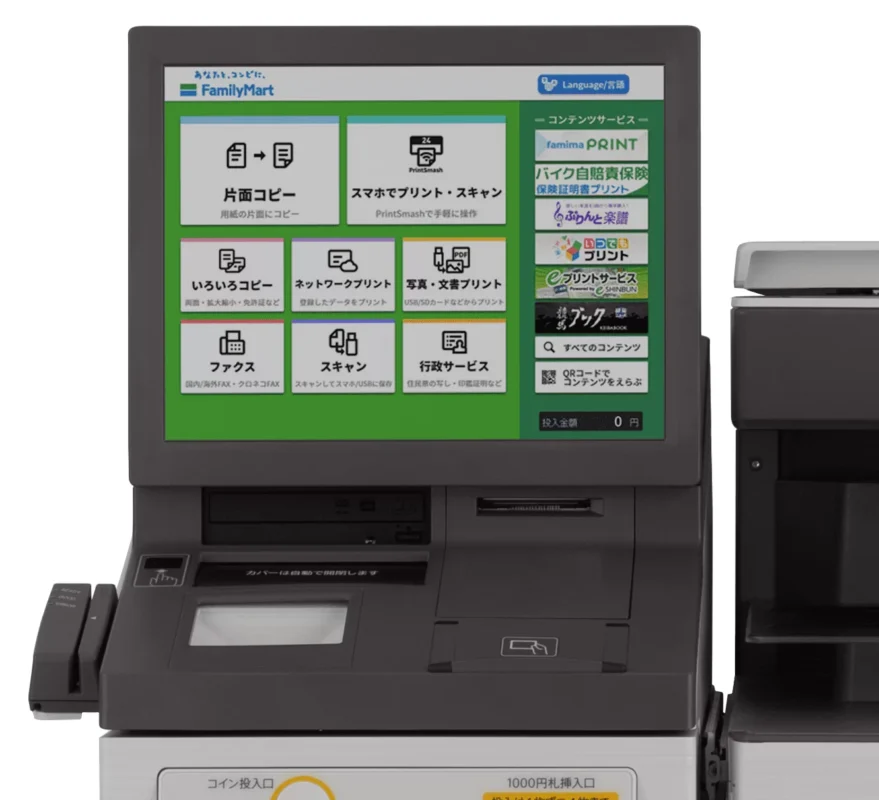
INSTRUCTIONS FOR SMARTPIT PAYMENT AT FAMILYMART USING COPY MACHINE (NEW)
ENTER THE 13 DIGITS OF THE SMARTPIT CARD AND PRESS THE BUTTON: 「OK」
[/col]
[/row]
YOUR PAYMENT INFORMATION WILL BE DISPLAYED
SELECT THE BILL YOU WANT TO PAY AND PRESS THE BUTTON: 「OK」
PLEASE CHECK THE PAYMENT INFORMATION AGAIN AND PRESS THE BUTTON 「OK」
[/col]
[/row]
THE PAYMENT RECEIPT FROM THE COPY MACHINE WILL BE PRINTED. PLEASE TAKE THE RECEIPT LABELED 「商品名:スマートピットお支払い」 AND CHECK THE PRINTED INFORMATION BEFORE TAKING IT TO THE CASHIER.
Step 1
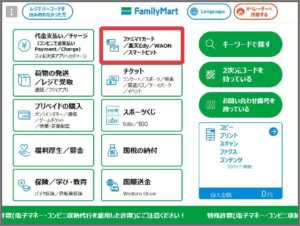
- ON THE SCREEN, SELECT: 「ファミマTカード/楽天Edy/WAON/スマートピット」
- YOU CAN CHANGE THE LANGUAGE FROM THE BUTTON: 「LANGUAGE」 AT THE TOP RIGHT OF THE SCREEN. THERE ARE 6 LANGUAGES AVAILABLE: JAPANESE, CHINESE, ENGLISH, KOREAN, PORTUGUESE, AND RUSSIAN.
Step 2
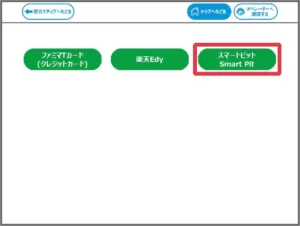
- SELECT THE BUTTON: 「スマートピット Smart Pit」
Step 3
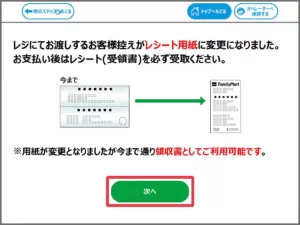
- THE RECEIPT INFORMATION WILL BE DISPLAYED ON THE SCREEN. CONFIRM THE CONTENTS AND PRESS THE BUTTON: 「次へ」
Step 4
- THE SMARTPIT PAYMENT DETAILS WILL BE DISPLAYED. PLEASE CHECK THE DETAILS AND PRESS THE BUTTON: 「確認」
Step 5
Step 6
- IF YOU ARE PAYING MULTIPLE TIMES, PLEASE RE-ENTER AFTER COMPLETING THE SELECTED PAYMENT.
- WHEN 2 OR MORE ITEMS ARE SELECTED, THE FAMI SCREEN WILL DISPLAY AND ASK YOU TO START OVER.
Step 7
Step 8
- THE RECEIPT IS VALID FOR 30 MINUTES AFTER ISSUANCE. PLEASE COMPLETE THE PAYMENT WITHIN 30 MINUTES.
INSTRUCTIONS FOR SMARTPIT PAYMENT AT FAMILYMART USING GREEN PORT MACHINE

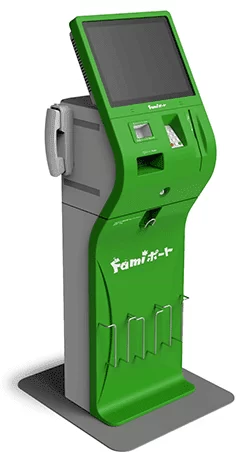
Step 1
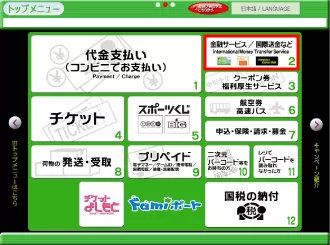
From the top menu of the FamiPort, select “Financial Services/International Remittance, etc.”
*You can change the language from the “LANGUAGE” button in the top right. The Smart Pit service supports six languages: Japanese, Chinese, English, Korean, Portuguese, and Russian.
*This website will use the Japanese screen for explanation.
Select 「金融サービス/国際送金など」
Step 2From the “Financial Services/International Remittance, etc.” screen, select “Smart Pit.”
Select 「スマートピット」
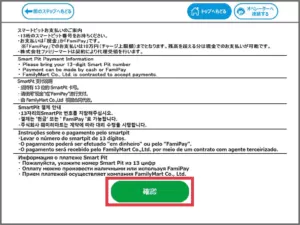
[/col] [/row]Step 3The “Smart Pit Payment Guide” will be displayed, so after confirming the content, press the “Confirm” button.
Select「確認」OK
[/col] [/row]
INSTRUCTIONS FOR SMARTPIT PAYMENT AT LAWSON (MINI STOP) USING LOPPI MACHINE

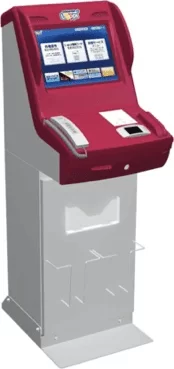
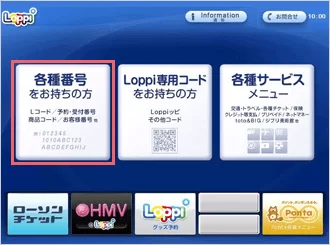
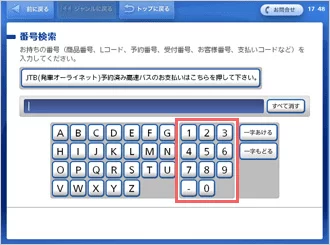
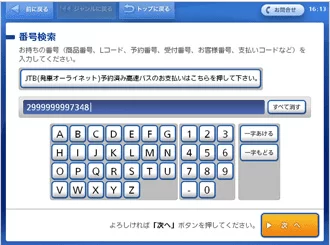
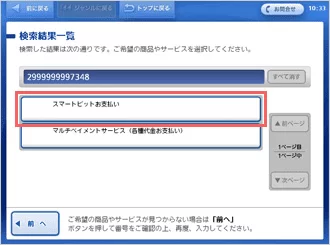
Step 1
From the Loppi screen, select “For those with various numbers.”
Select 「各種番号をお持ちの方」
Step 2
On the number search screen, please enter the “Smart Pit number (13 digits).”
Enter the 13-digit Smart Pit number (Make sure to enter your correct number)
Step 3
After entering the “Smart Pit number (13 digits),” press the “Next” button.
After entering the number, press 「次へ」
Step 4
Two services will be displayed. Select “Smart Pit Payment.”
*If the entered number is not “13 digits,” the “Smart Pit Payment” option will not appear. In this case, press the “Previous” button or the “Go Back” button to re-enter the “Smart Pit number (13 digits).”
Select 「スマートピットお支払い」
Step 5
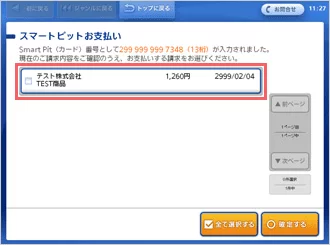
The payment information will be displayed.
Please select (touch) the payment information you wish to pay.
* If multiple bills are registered, all registered payment information will be displayed.
Confirm the payment amount and select the corresponding payment information.
Step 6
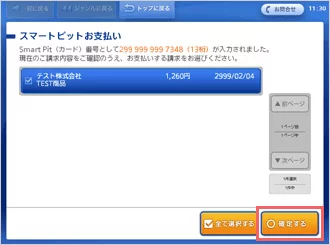
Once the selection (touch) of the payment information is completed, press the “Confirm” button.
When the payment content turns green, select 「確定する」
Step 7
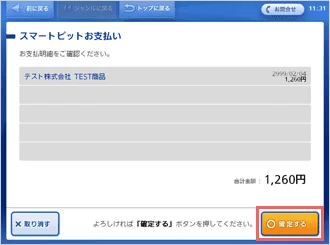
After reviewing the selected payment information again, press the “Confirm” button.
Confirm the payment details once again. If everything is correct, press 「確定する」
Step 8
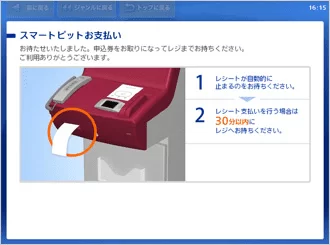
A receipt will be issued. Please take the receipt labeled “Smart Pit Payment Application” and verify the printed information before proceeding to the cashier to make your payment.
* The receipt is valid for 30 minutes after issuance. Please complete the payment within 30 minutes.
The machine will print out a payment receipt. Please take it to the combini cashier for payment.